Adult ADHD and Digital Overload: How to Reduce Distraction and Reclaim Focus
Adult ADHD and digital overload can make an ordinary day feel constantly interrupted.
You begin one task.
Then an email arrives.
A message appears.
A notification lights up.
You check one thing.
However, that one thing leads to another.
A short video becomes five.
One browser tab becomes ten.
Meanwhile, the original task remains unfinished.
By the end of the day, you may feel as though you have been busy for hours but still have very little to show for it.
That feeling can be frustrating.
However, the problem is not always a lack of discipline.
Modern digital environments are designed to compete for attention.
Therefore, rather than relying only on willpower, it can be more useful to change the environment itself.
The goal is not to remove technology from your life.
Instead, the aim is to make digital tools more deliberate, quieter and easier to control.
What Is Digital Overload?
Digital overload happens when the amount of incoming information becomes difficult to manage.
This may include:
- emails;
- messages;
- social media;
- news;
- work platforms;
- notifications;
- videos;
- browser tabs;
- app alerts;
- digital reminders.
Each item may seem small.
However, together they create constant switching.
Your attention moves from task to task, app to app and message to message.
As a result, concentration becomes more fragmented.
This is one reason adult ADHD and digital overload can become closely connected with distraction, overwhelm and fatigue.
Your Phone Is Not Neutral
A smartphone is useful.
It can help with:
navigation;
calendar reminders;
communication;
banking;
work;
shopping;
entertainment.
However, the same device also provides hundreds of opportunities to interrupt attention.
Therefore, the question is not:
“Should I use my phone?”
A more useful question is:
“Which parts of my phone help me, and which parts repeatedly pull me away from what matters?”
That distinction matters.
Adult ADHD and Digital Overload: Start With Notifications
Notifications create instant demands.
A sound.
A vibration.
A banner.
A red number.
Each one says:
“Look at me now.”
Therefore, one of the simplest digital changes is to reduce unnecessary alerts.
For example, consider turning off notifications from:
shopping apps;
social media;
games;
news apps;
non-urgent group chats.
Keep the alerts that genuinely matter.
As a result, your device becomes quieter.
Not Everything Needs an Immediate Alert
Ask:
“Do I need to know about this immediately?”
For many apps, the answer is no.
You can still open the app later.
However, removing the alert stops the app from deciding when your attention moves.
This creates a small but important boundary.
Use Notification Levels
You might divide notifications into three categories.
Immediate
Calls from important contacts.
Essential calendar reminders.
Critical work alerts.
Check Later
Email.
Messaging apps.
General work platforms.
Off
Shopping offers.
Social notifications.
News alerts.
Games.
As a result, the digital environment becomes more intentional.
Adult ADHD and Digital Overload at Work
Workplaces can create constant digital interruption.
Email.
Teams.
Slack.
Messages.
Calendar alerts.
Project platforms.
Meanwhile, you are expected to complete work that requires concentration.
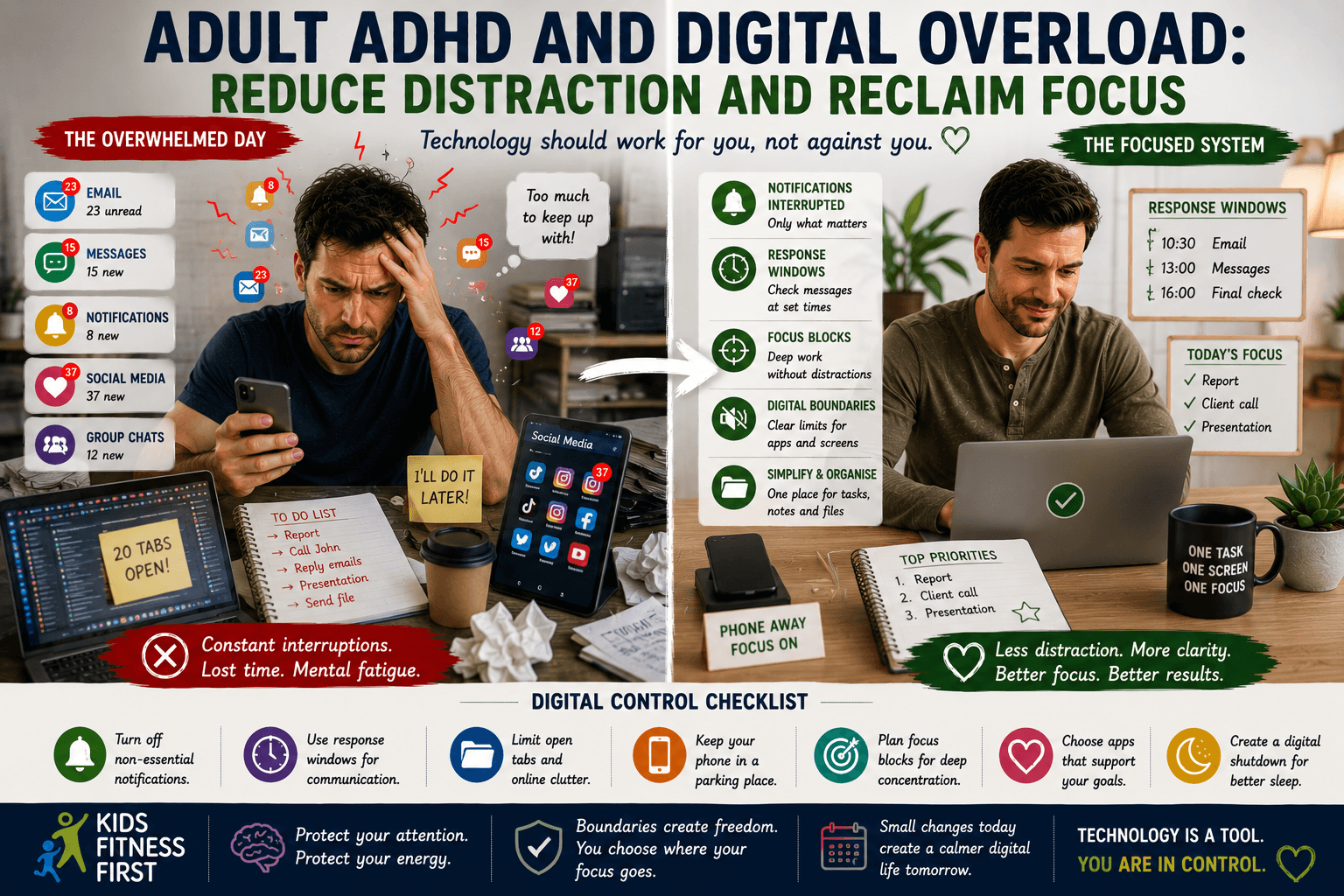
Therefore, response windows can help.
For example:
10:30 — check email
1:00 — check messages
4:00 — final communication check
This may not suit every job.
However, where possible, grouping communication can protect deeper work.
Close Email During Focused Work
Email is particularly difficult because it creates the feeling that something new may arrive at any moment.
Therefore, during focused work, consider closing it.
Use a planned time to return.
As a result, you remove one source of repeated checking.
This connects directly with adult ADHD and boundaries from Article 20.
Adult ADHD and Digital Overload: Reduce Open Tabs
Too many browser tabs create visual noise.
Each tab represents:
unfinished information;
a future decision;
something to remember;
something to return to.
Therefore, too many tabs can become a digital version of a cluttered desk.
As a result, the browser itself becomes another source of mental load.
Use a Tab Rule
For example:
Maximum 5 active tabs during focused work.
Everything else goes into:
bookmarks;
reading list;
saved folder.
Or simply close it if it is not important.
Therefore, you reduce the number of visible demands.
Create a “Later” Folder
If you are afraid of losing useful information, create one place for it.
For example:
Read Later
Research Later
Ideas
Now you do not need to keep twenty tabs open.
As a result, the information is safe without remaining visible all day.
Adult ADHD and Digital Overload With Social Media
Social media can be useful for connection, information and entertainment.
However, it is also designed to keep you engaged.
There is always another post.
Another video.
Another comment.
Therefore, use boundaries rather than relying only on intention.
For example:
social media after lunch;
20-minute timer;
no social apps during work blocks;
phone out of reach while concentrating.
These limits create friction.
Use a Social Media Window
A simple rule might be:
12:30–1:00 — social media
or:
After work only
This does not need to be perfect.
However, it gives scrolling somewhere to live.
Without a boundary, it can spread across the whole day.
Remove Social Apps From the First Screen
If an app is visible every time you unlock your phone, it creates an automatic cue.
Therefore, move distracting apps away from the home screen.
You can even place them inside a folder.
As a result, opening the app becomes a more deliberate action.
Adult ADHD and Digital Overload With Short-Form Video
Short-form video can make time disappear.
You open one clip.
Then another starts automatically.
Eventually, twenty or thirty minutes may pass.
Therefore, make time visible.
Use a timer.
Set a limit.
Leave the app when the timer ends.
As a result, entertainment becomes intentional rather than endless.
Use Time Visibility
Article 10 explored adult ADHD and time blindness.
The same principle applies online.
You may feel as though you have been scrolling for five minutes.
In reality, it may be forty.
Therefore, use external time.
For example:
screen-time reminder;
timer;
alarm;
visible clock.
This gives you information that the app itself will not provide clearly.
Adult ADHD and Digital Overload With News
News can create repeated checking.
What happened?
What changed?
Is there an update?
However, constant checking can keep your attention in a state of alert.
Therefore, consider choosing one or two times to check reliable news sources.
For example:
morning;
early evening.
As a result, you stay informed without allowing updates to interrupt the whole day.
Be Careful With Breaking-News Alerts
Not every “breaking” notification needs your immediate attention.
Therefore, unless your work or responsibilities require it, consider turning off non-essential news alerts.
You can still choose when to look.
This protects attention from repeated urgency.
Adult ADHD and Digital Overload With Messaging
Messaging apps can create social pressure.
You see:
typing indicators;
read receipts;
online status;
unread numbers.
As a result, communication can feel more urgent than it actually is.
Therefore, set expectations.
For example:
“I may not reply immediately during work hours.”
This creates a healthy communication boundary.
Do Not Treat Every Message as a Task
A message can simply be information.
You do not necessarily need to act immediately.
Therefore, ask:
Does this need action?
Can it wait?
Does it belong on my task list?
As a result, messages stop becoming invisible commitments.
Adult ADHD and Digital Overload With Work Chats
Group chats can be particularly distracting.
Many messages are not relevant to you.
However, the constant activity still attracts attention.
Therefore, mute non-essential channels where appropriate.
Check them at planned times.
As a result, important work gets more uninterrupted space.
Decision Fatigue and Digital Choice
Article 9 explored adult ADHD and decision fatigue.
Digital environments create endless choices.
Which app?
Which video?
Which message?
Which article?
Which tab?
Therefore, reducing digital options can protect mental energy.
For example:
one notes app;
one main task system;
one calendar;
one place for saved articles.
Simplification matters.
Avoid Too Many Productivity Apps
Productivity apps can become another form of overload.
You have:
one task app;
one notes app;
one calendar;
another habit tracker;
another reminder app;
another project system.
Eventually, you need to remember where everything is stored.
Therefore, choose fewer tools.
A simpler system is often easier to trust.
Adult ADHD and Digital Overload With External Memory
Article 8 explored adult ADHD and external memory.
Digital tools can be helpful for reminders.
However, they work best when the system is simple.
For example:
calendar for time;
task list for actions;
notes app for capture.
As a result, each tool has a clear role.
Digital Clutter Is Still Clutter
Hundreds of unread emails.
Thousands of photos.
A desktop full of files.
Dozens of notifications.
All of this can create background pressure.
Therefore, digital decluttering can be useful.
However, do not turn it into a massive project.
Start small.
Use a 10-Minute Digital Reset
Set a timer for ten minutes.
During that time:
delete unnecessary notifications;
close unused tabs;
clear your desktop;
unsubscribe from one unwanted email list;
move files into one folder.
Then stop.
As a result, the environment becomes slightly calmer without creating a large task.
Adult ADHD and Digital Overload With Email
Email can become endless.
Therefore, use simple categories.
For example:
ACT
Requires action.
WAITING
Someone else needs to respond.
REFERENCE
Useful information.
DELETE/ARCHIVE
No action required.
This can reduce the number of emails sitting in your inbox as vague unfinished tasks.
Do Not Use Your Inbox as a Task List
An email that requires action should become a task.
For example:
Email says:
“Please send the document Friday.”
Add:
“Send document Friday.”
to your task system.
Then archive or file the email where appropriate.
As a result, the responsibility is not hidden inside the inbox.
Adult ADHD and Digital Overload With Phone Checking
Phone checking can become automatic.
You pick up the phone without knowing why.
Therefore, ask:
“What am I opening this for?”
If you have no answer, put it down.
This small question can interrupt automatic behaviour.
Create a Phone-Parking Place
Article 21 explored adult ADHD and sleep.
The same idea can help during the day.
Place the phone somewhere specific during focused work.
For example:
desk drawer;
shelf;
another room;
bag.
As a result, checking requires a deliberate action.
Adult ADHD and Digital Overload on Low-Energy Days
Low-energy days can increase passive screen use.
You may not have energy for demanding tasks.
Therefore, scrolling becomes easy.
This is understandable.
However, passive digital use may not always provide the recovery you need.
Therefore, create low-energy alternatives.
For example:
short walk;
music;
quiet reading;
simple household reset;
rest.
The goal is not to ban screens.
Instead, it is to make sure they are not the only available default.
Create a Low-Energy Menu
For example:
Very Low Energy
Rest.
Listen to music.
Watch one planned programme.
Moderate Energy
Short walk.
Prepare one simple task.
Read.
Higher Energy
Exercise.
Work on hobby.
Social activity.
As a result, you have options beyond endless scrolling.
Adult ADHD and Digital Overload With Sleep
Article 21 explored sleep.
Digital boundaries are especially important at night.
For example:
phone charging away from bed;
Do Not Disturb;
no work email after a set time;
reduced screen stimulation during wind-down.
Therefore, digital boundaries can support both focus during the day and a calmer evening.
Exercise Can Provide a Digital Break
Article 22 explored adult ADHD and exercise.
Movement can create a natural break from screens.
For example:
walk without the phone in your hand;
go to the gym;
swim;
cycle;
play sport.
As a result, attention gets a period away from digital input.
Nutrition Can Be Affected by Digital Overload
Article 23 explored adult ADHD and nutrition.
Screens can also interfere with eating routines.
You work through lunch.
You scroll while eating.
You forget meals while absorbed in something.
Therefore, create meal boundaries where useful.
For example:
lunch away from the computer;
phone away for part of the meal.
This can help make eating more deliberate.
Adult ADHD and Digital Overload With Overwhelm
Article 12 explored adult ADHD and overwhelm.
Digital overload can add to mental load.
Every unread number.
Every notification.
Every open tab.
Therefore, when overwhelm builds, reduce digital input.
Turn on Do Not Disturb.
Close unnecessary apps.
Silence non-essential alerts.
As a result, the environment stops adding new demands.
Boundaries Make Digital Life Easier
Article 20 explored boundaries.
Digital boundaries are simply another form of limit.
For example:
no work email after 7 pm;
no social media before lunch;
focus mode during work blocks;
phone away during important conversations.
Therefore, boundaries help decide in advance when technology gets access to your attention.
Self-Trust Helps You Ignore the Ping
Article 19 explored adult ADHD and self-trust.
A notification can create uncertainty.
“Maybe it is important.”
“Maybe I should check.”
However, if you have decided to check messages at 11 am, trust the system.
Unless something genuinely urgent is expected, allow the notification to wait.
As a result, your own plan becomes more powerful than every incoming alert.
Self-Criticism Does Not Fix Digital Habits
Article 18 explored adult ADHD and self-criticism.
If you spend an hour scrolling, you may think:
“I have wasted the whole day.”
That judgement may make you feel worse.
Instead, ask:
What triggered the scrolling?
Was I tired?
Avoiding something?
Bored?
Overwhelmed?
Therefore, use the behaviour as information.
Then change one part of the environment.
Adult ADHD and Digital Overload After a Late Diagnosis
After a late ADHD diagnosis, digital habits may begin to make more sense.
Perhaps notifications always pulled you away quickly.
Maybe social media made time disappear.
Alternatively, you may have relied heavily on digital tools to remember appointments and tasks.
Understanding adult ADHD and digital overload can help you separate useful technology from distracting technology.
The goal is not to reject digital tools.
Instead, it is to use them intentionally.
Build a Personal Digital Toolkit
Your toolkit might include:
Notification Filter
Keep only essential alerts.
Focus Mode
Reduce interruptions during important work.
Response Windows
Choose when to check communication.
Phone Parking Place
Move the device away during focus periods.
Tab Limit
Reduce visual digital clutter.
Read-Later Folder
Save information without keeping it open.
Screen Timer
Make online time visible.
Digital Shutdown
Create an evening endpoint.
Use the tools that solve your actual problems.
A Simple Digital Reset Routine
When adult ADHD and digital overload feel difficult, try this:
First: Turn off non-essential notifications.
Next: close unnecessary browser tabs.
Then: choose one communication window.
After that: put the phone away during one focus block.
Next: create one place for tasks and one place for notes.
Finally: add a digital shutdown time in the evening.
Do not try to fix everything at once.
Start With One Digital Boundary
Choose the biggest distraction.
For example:
If notifications interrupt work:
Turn off non-essential alerts.
If social media steals time:
Use a 20-minute window.
If the phone interrupts sleep:
Charge it away from bed.
If email dominates the day:
Check it at planned times.
Test one change.
Afterwards, see whether your attention feels different.
Reflection Questions
- Which app steals the most attention from you?
- How many notifications genuinely need an immediate response?
- Do you check your phone without knowing why?
- Could you create one communication window?
- How many browser tabs are usually open?
- Would a phone-parking place help?
- Are you using too many productivity apps?
- What digital habit affects your sleep most?
- Which screen activity genuinely helps you relax?
- What one digital boundary could you test today?
Conclusion
Adult ADHD and digital overload can make attention feel constantly divided when notifications, messages, apps and screens compete throughout the day.
However, technology does not need to control when your attention moves.
Instead, reduce unnecessary notifications.
Use response windows.
Create focus periods.
Limit open tabs.
In addition, give social media and digital entertainment clearer boundaries.
Most importantly, design your devices to support your priorities rather than constantly interrupt them.
Therefore, instead of asking:
“Why can’t I stop getting distracted by my phone?”
try asking:
“What is my digital environment repeatedly asking me to notice, and which of those demands do I actually need?”
Over time, adult ADHD and digital overload may become easier to manage when technology becomes quieter, simpler and more deliberate.
SUGGESTED INTERNAL LINKS
- Adult ADHD and Nutrition: How to Build Simple Eating Routines That Work
- Adult ADHD and Exercise: How Movement Can Support Focus, Energy and Wellbeing
DISCLAIMER
This article is provided for general educational and informational purposes only. It does not provide medical, psychological, diagnostic or therapeutic advice and should not be used as a substitute for individual guidance from an appropriately qualified healthcare professional.
Digital habits, distraction, attention difficulties and stress can have many causes, and ADHD experiences vary considerably between individuals. Therefore, if attention problems, compulsive digital use, sleep disruption, anxiety or related difficulties are severe, persistent or significantly affecting your wellbeing or daily life, please speak with an appropriately qualified healthcare professional.